Graphic Design Certificate
- VA-approved, facility code 25112332
- 84 hours
- NYC or self-paced
- $2,995
Begin your journey as a professional graphic designer by learning the essential skills and tools used by industry experts. Gain hands-on experience in Adobe Photoshop, InDesign, and Illustrator, and create a stunning portfolio to showcase your talent to potential employers or clients.
Approved for VA education benefits under Noble Desktop, VA facility code 25112332. Verify in the VA GI Bill Comparison Tool.
This program includes
- 84 hours of live training. Project-based, in person at 185 Madison Avenue with an instructor in the room.
- 5 courses in the program. Scheduled classes, not recorded lectures; labs marked (Self-Paced) below run on your own time.
- 1 elective course. Included at no extra cost: AI for Graphic Design.
- 1-on-1 mentoring. Time with an instructor outside of class, scheduled around your commitments.
- Software access. The software used in class, for the duration of the program.
- Free retake within one year. Repeat any class in the program at no cost.
- Class recordings. Available for 30 days after each class, so a missed session is recoverable.
- A verified certificate. Noble Desktop is licensed by the New York State Education Department.
- A VA certifying official. One of our School Certifying Officials submits your enrollment certification to VA so you are not chasing it.
- Interest-free payment plans. If your benefit leaves a balance: a pay-as-you-go installment plan, or Climb Credit. 0% interest, no fees.
- Job-search support. Portfolio review, resume, and interview preparation with an instructor. Support, not a placement promise.
Learn the Skills Guarantee™
Master the concepts and skills outlined in the program, or your tuition is refunded. It applies to every course here. See the full terms on nobledesktop.com/benefits.
Program overview
Special Limited Time Promotion : Receive our AI for Graphic Design course for free when you register for this certificate program.
- Adobe Creative Cloud Applications:: Gain hands-on experience with Adobe Photoshop, Illustrator, and InDesign, the key tools for any Graphic Designer. Learn to retouch images, create scalable vector graphics, and design cohesive layouts, preparing you for a range of design tasks.
- Graphic Design Theory:: Develop a deep understanding of essential design concepts, including composition, color theory, typography, and design principles. Learn how to apply these concepts to create visually compelling and balanced designs across various media formats, from print to digital.
- Design for Branding & Marketing Materials:: Expand your portfolio by working on branding and marketing projects such as logos, packaging, and promotional materials. These real-world design tasks will demonstrate your ability to create impactful designs that communicate brand identity effectively.
- Portfolio Projects & Industry-Ready Skills:: Through a series of portfolio-building assignments, you’ll create and refine projects that meet professional design standards. These projects, including digital and print designs, will ensure you leave the program with a portfolio that highlights your range of skills and creativity.
Projects you build
Work you produce in this program, the same examples shown on nobledesktop.com. Coursework you keep, not client work we place for you.
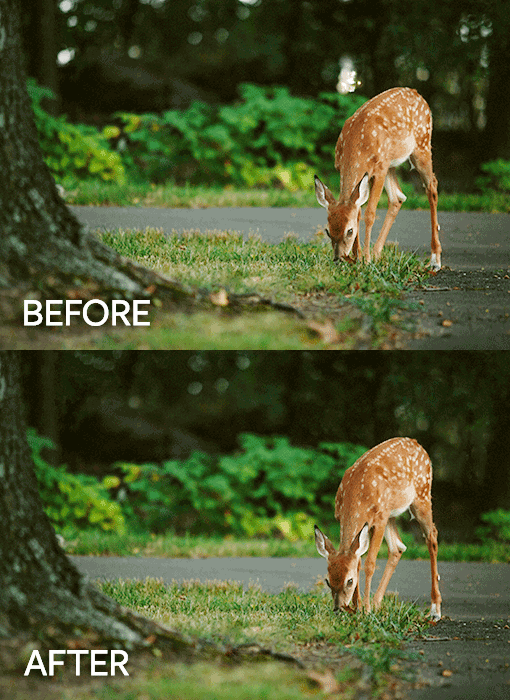
photo showing before and after retouching
Remove unwanted elements from your photos. Retouch images using the Healing tools and Content-Aware Fill.
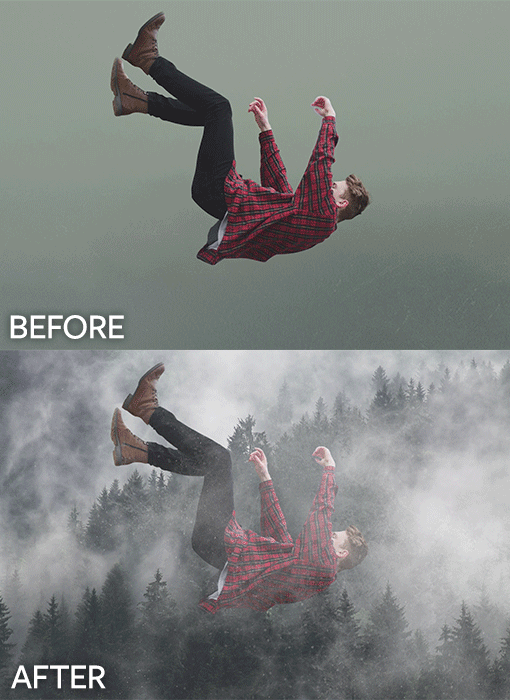
Backgrounds swapped out in Photoshop
Learn how to select parts of a photo and to replace the background.

social media graphic designed in Photoshop
Design social media graphics for Facebook, Instagram, or any social media platform. Combine photos, text, and graphics such as logos.
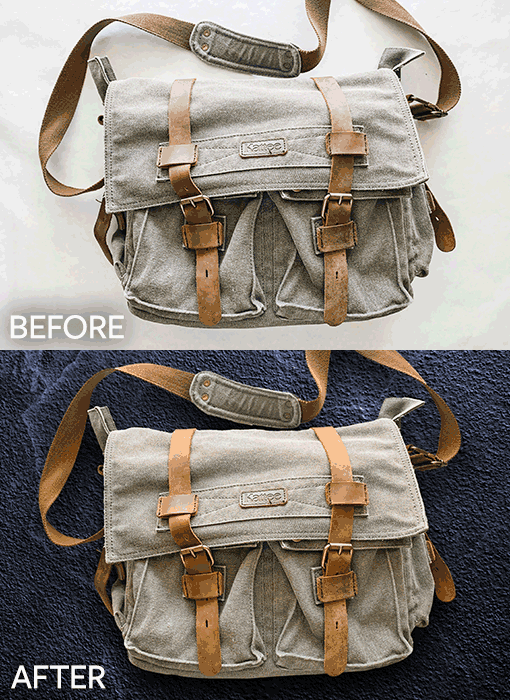
New background added and color changed with Photoshop
Change the color, contrast, and more with Photoshop’s non-destructive adjustment layers. Choose what areas you want to change using masks.
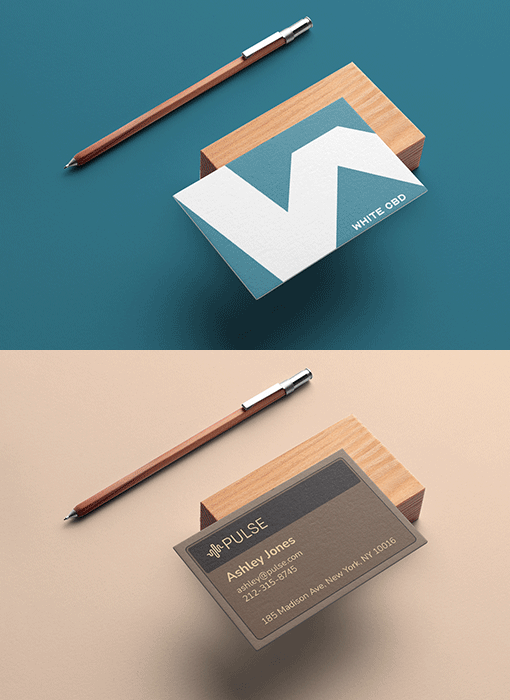
Business card mockup made with Photoshop
Make professional-looking presentations by placing your designs (such as a business card) into realistic mockups

Illustrator’s Pen tool is powerful but challenging. We’ll guide you in how to use it, so you can draw custom vector shapes.
Courses in this program
5 courses, 84 hours total. Scheduled, in-person classes, plus self-paced lab time.
- Adobe InDesign Bootcamp18 hrs
- Adobe Photoshop Bootcamp18 hrs
- Adobe Illustrator Bootcamp18 hrs
- Graphic Design Portfolio Bootcamp30 hrs
- Graphic Design Capstone Project (Guided Self-Paced)18 hrs
Electives included at no extra cost
- AI for Graphic Design 12 hrs
Self-paced online option
Learn online at your own pace with video training and live support from our instructors. If you purchase the self-paced option, you can attend the live course for free within one year.
Ask before you enrol either way: VA treats an exclusively-online program differently from one that meets in person, and that affects what it pays. One of our School Certifying Officials will walk you through it.
Schedule and enrollment
- Free retake within a year
- Class recordings for 30 days
- 1-on-1 mentoring included
- Software access included
- Interest-free payment plans
- Certification handled by our SCO
All sessions meet in person at 185 Madison Avenue, and dates and times are Eastern. Pick a date to prefill your enrollment, or ask us to help you choose. Nothing is submitted to VA and nothing is binding until you decide.
| Start | Ends | Days | Times | |
|---|---|---|---|---|
| Sep 27, 2026 | Dec 27, 2026 | Sun | 10:00-17:00 | Choose this date |
| Oct 19, 2026 | Nov 20, 2026 | Mon, Tue, Wed, Fri | 10:00-17:00 | Choose this date |
| Nov 30, 2026 | Jan 8, 2027 | Mon to Fri | 10:00-17:00 | Choose this date |
| Jan 4, 2027 | Feb 12, 2027 | Mon to Fri | 10:00-17:00 | Choose this date |
| Jan 5, 2027 | Apr 1, 2027 | Tue, Thu | 18:00-21:00 | Choose this date |
| Jan 10, 2027 | Apr 18, 2027 | Sun | 10:00-17:00 | Choose this date |
| Feb 16, 2027 | Mar 26, 2027 | Tue, Wed, Thu, Fri | 10:00-17:00 | Choose this date |
| Mar 29, 2027 | May 14, 2027 | Mon, Tue, Wed, Fri | 10:00-17:00 | Choose this date |
Graphic Design Certificate reviews
Reviews from Noble Desktop students in this subject area, as published on nobledesktop.com/testimonials. These are individual experiences and are not a promise of any particular result.
Absolutely loved my experience in this class! I learned so much about Adobe and how to use their products to build a custom portfolio that I can send to future employers.
Eugenio is incredibly knowledgeable, patient, and talented. He shared lots of industry insight and made the class interesting beyond simply learning the skills in the programs.
This class really boosted my knowledge of graphic design and the Adobe Suite. The pacing was excellent and the assignments were challenging.
Tuition and your VA benefits
How class runs
Every VA-approved program here meets in person at 185 Madison Avenue in Manhattan, with an instructor in the room rather than a recorded lecture. Classes are small, you work on your own machine, and you can ask a question and get an answer in the moment.
- In person in NYC. 185 Madison Avenue, near Madison Square Park, on the 4/6, N/R/W, F/M and PATH.
- Recordings if you miss one. Available for 30 days after each session, so a missed class is recoverable.
- Retake free within a year. Sit any class in the program again at no cost, for any reason.
- An SCO handles the VA side. One of our School Certifying Officials submits your enrollment certification so you are not chasing it.
Printed workbooks included. This program comes with detailed workbooks, in print or ebook, at no additional cost.
Expert instructors
The instructors who teach this program at Noble Desktop. You learn from working practitioners, in the room.
-
 Dan RodneySchool Director, Instructor, & Senior Course Developer
What you will learn
- Adobe Photoshop to retouch photos and create graphics Adobe InDesign to create page layouts with text and images Adobe Illustrator to create vector graphics such as logos, icons, and more
- Understand graphic design concepts & processes
- Learn about the elements of design
- Develop and expand your graphic design portfolio
- Learn how to speak about your work and how to incorporate and evaluate critiques Upload your work to Adobe Portfolio (included with your Creative Cloud membership) to create your portfolio website
Skills covered
The tools and technologies this program teaches.
- Adobe Photoshop
- Adobe InDesign
- Adobe Illustrator
- Adobe Creative Cloud
- Graphic Design Principles
- UI Design Principles
- Typography
- Color Theory
- Layout
- Graphic Design Portfolio
- Adobe Portfolio
- Mohamed Ossama
Where graduates go
Roles this program prepares you for. Training and portfolio support, not a job guarantee or a placement promise, and we publish no salary figures here.
- Graphic Designer
- Digital Designer
- Visual Designer
- Designer
- Contact Us
Your certificate
Finish the program and you receive a verified certificate from Noble Desktop, which is licensed by the New York State Education Department. It states the program and the hours completed. It is a school credential, not a state licence or an industry certification, and we do not claim it is one.
Frequently asked questions
Can I use my GI Bill® for this program?
Will my benefits cover the whole cost?
Is this program online or in person?
How do I enroll using my benefits?
What if I have used part of my benefit already?
Other Design programs
If you are weighing two of them, call and we will talk it through against your entitlement and your timeline. Every approved program is on the main hub, filterable by track.
GI Bill® is a registered trademark of the U.S. Department of Veterans Affairs (VA). Approval of Noble Desktop's programs for VA education benefits does not constitute endorsement by VA or any government agency. VA determines eligibility and payment amounts.